BMW Battery Registration: How to Register a New Battery, Cost & Tools
BMW battery registration is an important step after replacing the 12-volt battery on many modern BMWs. Installing the new battery physically is only part of the job—the vehicle’s battery-management system also needs to know that a new battery has been installed.
Registration is not the same thing as battery coding. If you replace the battery with the same type and capacity, registration may be all that is required. If you change battery capacity or battery type, additional coding or configuration may be necessary depending on the BMW.
This guide explains what BMW battery registration does, how to register a new BMW battery, which tools can do it, typical cost options, the difference between registration and coding, and what to check if your old battery kept going dead.
This page contains affiliate links. If you buy through them, we may earn a commission at no extra cost to you.
BMW Battery Registration: Quick Answer
After replacing the 12-volt battery on many BMWs, use a BMW-capable diagnostic tool to register the new battery with the vehicle.
Registration tells the BMW’s energy-management system that the battery has been replaced. If you install the same battery type and capacity, registration is generally the key electronic step. If you change capacity or battery type, the car may also require coding or additional configuration.
| Situation | What You May Need |
|---|---|
| Same battery type and capacity | Battery registration |
| Different battery capacity | Registration plus possible coding/configuration |
| Different battery type or chemistry | Confirm compatibility and coding requirements before installation |
| Old battery repeatedly went dead | Diagnose battery drain or charging problem before assuming replacement fixes it |
| DIY battery replacement | BMW-capable registration tool or compatible app/adapter |
What Is BMW Battery Registration?
BMW battery registration is the process of recording a replacement 12-volt battery in the vehicle’s power-management system.
Modern BMWs monitor battery condition and electrical energy use rather than treating the battery as a completely standalone component. The car keeps information related to battery and power-management history and uses that information as part of its electrical strategy.
When the battery is replaced, registration tells the vehicle that it should stop treating the installed battery as the old one.
This is why simply disconnecting the old battery and installing a new one may not complete the job on a BMW that uses battery registration.
Does a BMW Battery Have to Be Registered?
Many modern BMWs equipped with advanced battery and energy-management systems require or specify registration after replacement. The exact requirement depends on chassis, model year, electrical architecture, and battery system.
Do not assume that every BMW ever built uses the same procedure. Older BMWs and newer vehicles with different electrical architectures can have different requirements.
If your BMW’s service information specifies battery registration, treat it as part of the replacement—not an optional extra.
What Happens If You Don’t Register a New BMW Battery?
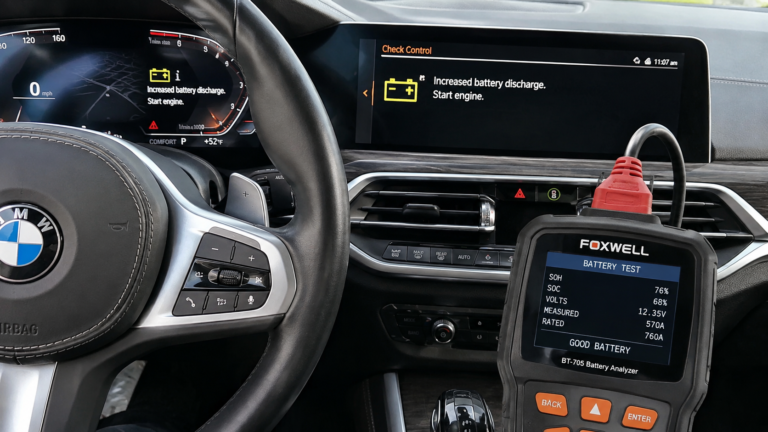
BMW service information specifically warns that failing to register a replacement battery can result in incorrect Check Control messages on applicable vehicles.
More broadly, the car has not been told that the battery-management situation has changed. That defeats part of the purpose of the vehicle’s energy-management system.
The practical answer is simple: if the BMW calls for registration, register the battery rather than waiting to see whether a warning appears.
BMW Battery Registration vs Coding
BMW battery registration and BMW battery coding are not the same thing. This is one of the most confusing parts of BMW battery replacement.
| Battery Registration | Battery Coding / Configuration |
|---|---|
| Tells the vehicle a new battery was installed | Changes how the vehicle is configured for the installed battery |
| Normally performed after a replacement | May be needed when battery specifications are changed |
| Applicable when replacing with the same specification | Especially important to investigate when changing capacity or battery type |
| Available through BMW-capable service tools | Requires a tool or software capable of the necessary coding/configuration |
If you are replacing the old battery with the same type and capacity, the process is much simpler than intentionally changing the battery specification.
If you want to install a battery with a different amp-hour capacity or change from one battery type to another, confirm the exact requirements for your BMW before buying the battery.
How to Register a BMW Battery
The exact menu names vary by scanner, app, BMW chassis, and software version, but the basic BMW battery registration process is similar.
- Install the correct replacement battery. Confirm battery type, capacity, fitment, terminals, venting, and mounting before continuing.
- Connect the BMW-capable diagnostic tool. Most modern tools connect through the vehicle’s OBD2 diagnostic port.
- Turn the vehicle electronics on as instructed by the tool. Do not start guessing at menu options if the scanner gives model-specific instructions.
- Identify the BMW. Allow automatic VIN identification when supported or select the exact chassis/model.
- Open the service or battery-management functions.
- Select battery replacement or battery registration.
- Confirm whether the replacement battery matches the previous specification.
- Complete the registration procedure.
- Confirm that the tool reports successful registration.
- Scan the BMW for remaining battery, charging, or power-management faults.
Do not select a different battery capacity simply because the scanner gives you the option. The entry should match the actual battery and the configuration supported by your BMW.
BMW Battery Registration With ISTA
ISTA is BMW’s factory diagnostic environment and is the reference point for the registration process.
BMW service information has used the following registration path in ISTA:
Service function → Body → Power supply → Battery → Register battery change
The exact software interface can vary with vehicle generation and ISTA version, but the important point is that BMW treats battery replacement as a defined service function rather than simply a mechanical remove-and-install job.
Best BMW Battery Registration Tools for DIY Owners
The BMW battery registration tool you choose depends on whether you want a dedicated BMW scanner or a lower-cost app-based setup.
| Tool | Best For | Battery Registration | Tradeoff |
|---|---|---|---|
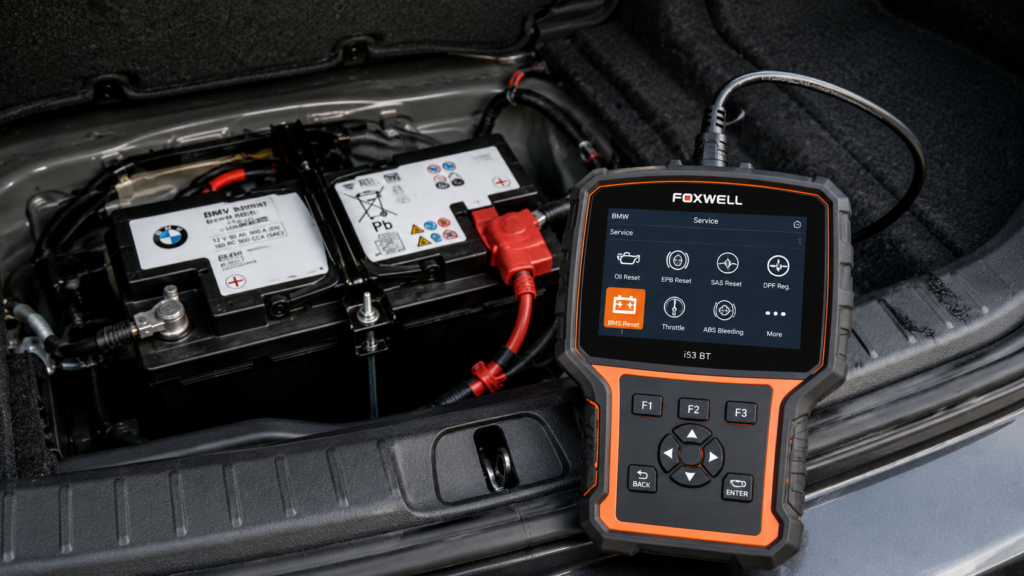
| Foxwell i53BT | BMW owner wanting a reusable standalone diagnostic tool | Supported on applicable BMWs | Higher upfront cost |
| OBDLink MX+ + BimmerLink | Owners who prefer app-based BMW diagnostics | Supported through BimmerLink on compatible BMWs | Requires the BimmerLink app in addition to the adapter |
| Carista EVO | Owner wanting an app-based option | Supported through Carista service tools on compatible vehicles | Paid Pro functionality is required for advanced features |
| ISTA | Factory-level BMW diagnostic workflow | BMW’s service method | More involved than a simple consumer scanner |
Whichever tool you choose, verify your exact BMW chassis and model-year compatibility before buying. A scanner supporting battery registration on one BMW does not guarantee every service function works on every BMW ever produced.
Foxwell i53BT for BMW Battery Registration
The Foxwell i53BT makes sense if you want battery registration to be only one of several BMW diagnostic functions available from the same standalone tool.
Turner’s current BMW/MINI version lists battery registration along with BMW-specific fault-code access, service resets, ABS functions, airbag functions, TPMS functions, data logging, and other diagnostic capabilities.
That makes the Foxwell easier to justify if you plan to keep the BMW and perform your own maintenance rather than purchasing a device solely for one battery replacement.
Best fit: DIY BMW owner who wants a reusable standalone diagnostic scanner rather than relying on a phone app.
OBDLink MX+ + BimmerLink for BMW Battery Registration
The OBDLink MX+ paired with BimmerLink is a strong option if you prefer using your phone instead of carrying a dedicated handheld scanner.
BimmerLink supports battery registration on compatible BMWs along with BMW-specific diagnostics, live data, service functions, and access to multiple control units. The OBDLink MX+ provides the Bluetooth connection between the car and the app.
Best fit: BMW owner who wants app-based diagnostics and battery registration with a reusable adapter that can also support other diagnostic apps.
Carista EVO for BMW Battery Registration
The Carista EVO takes a different approach. It is a Bluetooth OBD2 adapter that works with the Carista mobile app rather than functioning as a standalone handheld scanner.
Battery registration is included among Carista’s supported service functions on compatible BMWs. However, advanced service features require Carista’s paid Pro functionality, so factor the app cost into the comparison rather than looking only at the price of the adapter.
Best fit: owner who prefers a phone-based tool and wants a lower initial hardware cost.
Can a Normal OBD2 Scanner Register a BMW Battery?
Do not assume that a generic OBD2 scanner supports BMW battery registration.
A basic scanner may read standardized engine and emissions codes but lack BMW-specific service functions such as battery registration, CBS resets, module diagnostics, or other manufacturer-level features.
Look specifically for BMW battery registration in the tool’s supported-function list for your vehicle.
For more on this distinction, see our BMW scanner vs OBD2 scanner guide.
BMW Battery Registration Cost
BMW battery registration cost depends primarily on whether you pay a shop to perform the service or buy a tool and register it yourself.
| Option | Cost Structure | Best For |
|---|---|---|
| BMW dealer or independent specialist | Shop labor or diagnostic/service charge | Owner who wants the replacement handled completely |
| App + Bluetooth adapter | Adapter plus any required app/subscription cost | Lower-cost DIY approach |
| Standalone BMW scanner | Higher one-time tool cost | Owner who expects to diagnose and maintain the BMW again |
If this is the only BMW service procedure you expect to perform yourself, paying a shop may be simpler. If you plan to keep the car and perform other maintenance, a capable BMW scanner can spread its cost across battery registration, diagnostics, service resets, and future troubleshooting.
Can You Register a BMW Battery at Home?
Yes, on many BMWs battery registration can be a practical DIY job if you have a compatible diagnostic tool and have already installed the correct replacement battery.
The registration procedure itself is usually much less mechanically involved than physically changing the battery. The bigger challenge is making sure you have:
- The correct replacement battery
- A diagnostic tool that supports your exact BMW
- The correct battery type and capacity information
- A clear understanding of whether you are registering the same specification or changing the battery configuration
If you are unsure about the battery specification or whether coding is required, verify that before completing the replacement rather than selecting settings by trial and error.
Can You Register a BMW Battery Without a Scanner?
Battery registration is a diagnostic/service function, so the normal instrument cluster or iDrive service-reset procedure should not be confused with registering a replacement battery.
You need a method capable of communicating with the BMW’s battery-management system. That can be a dedicated BMW scanner, compatible app and OBD adapter, or BMW diagnostic software such as ISTA.
Simply disconnecting the battery, turning the ignition on and off, or resetting a service reminder does not substitute for the registration procedure.
What If You’re Installing a Different BMW Battery?
This is where battery registration and battery coding become especially important to separate.
If the new battery has the same specification as the old battery, the process is normally more straightforward.
If you change:
- Battery capacity
- Battery type
- Battery chemistry
- Another specification used by the vehicle’s power-management configuration
then do not assume simple registration is enough. Check the correct procedure for your exact BMW and confirm whether the vehicle must also be coded or configured for the new specification.
The safest DIY approach is usually replacing the battery with the correct equivalent specification unless you have a specific reason and verified procedure for changing it.
BMW Battery Registration After a Dead or Draining Battery
If the old BMW battery repeatedly discharged, do not assume installing and registering a new one has fixed the underlying problem.
A weak battery can certainly be the cause, but repeated discharge can also involve short-trip driving, charging problems, aftermarket electronics, parasitic current draw, or control modules that do not enter the expected sleep state.
This is particularly important because BMW diagnostic procedures use stored energy-management information when investigating discharge problems. Once the new battery is registered, some stored battery energy history can be cleared.
If the old battery repeatedly went dead, diagnose that problem before assuming the battery was the only failed component.
BMW Battery Registration by Model
Owners often search for registration procedures by model—such as BMW X3 battery registration or BMW X5 battery registration—but the chassis and model year matter more than the badge alone.
| BMW | What to Confirm |
|---|---|
| 3 Series / 328i / 330i | Chassis generation, model year, battery type and capacity |
| G20 3 Series / M340i | Exact electrical configuration and replacement battery specification |
| BMW X3 | Generation, engine, battery specification and tool compatibility |
| BMW X5 | Generation, engine/electrical system and battery specification |
| Other BMW models | VIN/chassis-specific service information and scanner coverage |
When shopping for a battery-registration tool, select your exact vehicle on the manufacturer’s or retailer’s compatibility checker instead of assuming every BMW function is universal.
Common BMW Battery Registration Mistakes
1. Installing the Wrong Battery First
Registration cannot make an incompatible battery correct. Confirm fitment, capacity, type, mounting, and venting before installation.
2. Assuming Registration and Coding Are the Same
Registering a replacement and changing the vehicle’s battery configuration solve different problems. Do not select a different capacity in the scanner just because the menu allows it.
3. Buying a Generic Scanner That Cannot Register Batteries
Check the supported service functions before buying. The word “OBD2” on the box does not guarantee BMW-specific battery functions.
4. Replacing the Battery Without Diagnosing Why It Died
If the battery repeatedly discharged, determine whether the old battery was actually defective or whether another electrical problem caused it to fail.
5. Assuming Successful Registration Fixes Every Battery Warning
Registration records the replacement. It does not repair a bad alternator, excessive parked-current draw, wiring problem, faulty module, or another electrical issue.
BMW Battery Registration FAQ
What is BMW battery registration?
BMW battery registration records the installation of a replacement battery in the vehicle’s energy-management system. It is a service procedure performed with compatible BMW diagnostic equipment.
How do I register a new BMW battery?
Install the correct battery, connect a BMW-capable diagnostic tool, identify the vehicle, enter the battery or service functions, and perform the battery-replacement registration procedure. Exact menu names depend on the tool and BMW.
Do I need to code a BMW battery if it is the same size?
If the replacement matches the original specification, registration is normally the key procedure. Additional coding becomes more relevant when battery type or capacity changes. Always verify the exact requirement for your chassis.
What scanner can register a BMW battery?
You need a BMW-capable scanner or service tool that specifically supports battery registration for your vehicle. Our main DIY options are the Foxwell i53BT for a standalone scanner, OBDLink MX+ paired with BimmerLink for an app-based setup, and Carista EVO as another app-based alternative. Always confirm compatibility for your exact BMW before buying.
Can Carista register a BMW battery?
Carista lists battery registration among its service functions for compatible BMWs. The advanced service functions require its paid Pro functionality, so check current vehicle compatibility and app requirements before purchasing.
Can a Foxwell scanner register a BMW battery?
BMW-focused Foxwell tools such as the i53BT list battery registration among their supported service functions. Check the manufacturer’s vehicle-function coverage for your exact chassis and model year before buying.
How much does BMW battery registration cost?
The cost depends on whether you pay a BMW dealer or independent shop for the service or perform it yourself. DIY costs range from an app-based adapter and required software to a more expensive reusable standalone BMW diagnostic scanner.
Can I drive before registering a new BMW battery?
If the vehicle specifies registration, complete the procedure as part of the battery replacement rather than deliberately leaving it unfinished. Registration only takes a few minutes with a compatible tool once the correct battery has been installed.
Final Recommendation
If your BMW requires battery registration, treat it as part of replacing the battery—not an optional diagnostic step to deal with later.
For a replacement with the same battery specification, install the correct battery and register the replacement with a compatible BMW diagnostic tool. If you are changing battery capacity or type, verify whether additional coding or configuration is required before proceeding.
For owners who plan to keep working on their BMW, the Foxwell i53BT is our preferred standalone BMW scanner. The OBDLink MX+ paired with BimmerLink is our preferred app-based diagnostic setup, while the Carista EVO is another simpler app-based option if you understand the Pro-function requirements.
And if the old battery repeatedly went dead, diagnose the reason for the discharge instead of assuming a new registered battery automatically fixes the underlying electrical problem.